Use a CNN to recognize sounds
This notebook contains all the code you need to use an existing (pre-trained) OpenSoundscape convolutional neural network model (CNN) to make predictions on your own data - for instance, to detect the song or call of an animal the CNN has been trained to recognize. It asssumes that you already have access to a CNN that has been trained to recognize the sound of interest.
To find publicly available pre-trained CNNs, check out the Bioacoustics Model Zoo.
If you are interested in training your own CNN, see the other tutorials at opensoundscape.org related to model training.
Before running this tutorial, install OpenSoundscape by following the instructions on the OpenSoundscape website, opensoundscape.org. More detailed tutorials about data preprocessing, training CNNs, and customizing prediction methods can also be found on this site.
Run this tutorial
This tutorial is more than a reference! It’s a Jupyter Notebook which you can run and modify on Google Colab or your own computer.
Link to tutorial |
How to run tutorial |
|---|---|
|
The link opens the tutorial in Google Colab. Uncomment the “installation” line in the first cell to install OpenSoundscape. |
The link downloads the tutorial file to your computer. Follow the Jupyter installation instructions, then open the tutorial file in Jupyter. |


[ ]:
# if this is a Google Colab notebook, install opensoundscape in the runtime environment
if 'google.colab' in str(get_ipython()):
%pip install "opensoundscape==0.12.1" "jupyter-client<8,>=5.3.4" "ipykernel==6.17.1"
package imports
The cnn module provides a function load_model to load saved opensoundscape models
[13]:
from opensoundscape.ml.cnn import load_model
from opensoundscape import Audio
import opensoundscape
load some additional packages and perform some setup for the Jupyter notebook.
[14]:
# Other utilities and packages
import torch
from pathlib import Path
import numpy as np
import pandas as pd
from glob import glob
import subprocess
[15]:
#set up plotting
from matplotlib import pyplot as plt
plt.rcParams['figure.figsize']=[15,5] #for large visuals
%config InlineBackend.figure_format = 'retina'
Load a model
Models can be loaded either from a local file (load_model(file_path)) or directly from the Bioacoustics Model Zoo like this:
Note: make sure to install the bioacoustics_model_zoo as a package in your python environment:
pip install bioacoustics-model-zoo==0.12.0
After installing, a running notebook must be restarted to gain access to the package
[16]:
import bioacoustics_model_zoo as bmz
# list available models from the model zoo
bmz.utils.list_models()
[16]:
[bioacoustics_model_zoo.BirdNET,
bioacoustics_model_zoo.SeparationModel,
bioacoustics_model_zoo.YAMNet,
bioacoustics_model_zoo.Perch,
bioacoustics_model_zoo.hawkears.hawkears.HawkEars,
bioacoustics_model_zoo.BirdSetConvNeXT,
bioacoustics_model_zoo.rana_sierrae_cnn.RanaSierraeCNN]
Some models require additional dependencies. HawkEars requires the timm and torchaudio packages to be installed in your environment.
[17]:
hawkears = bmz.HawkEars()
Downloading model from URL...
File hgnet1.ckpt already exists; skipping download.
Loading model from local checkpoint /Users/SML161/opensoundscape/docs/tutorials/hgnet1.ckpt...
Downloading model from URL...
File hgnet2.ckpt already exists; skipping download.
Loading model from local checkpoint /Users/SML161/opensoundscape/docs/tutorials/hgnet2.ckpt...
Downloading model from URL...
File hgnet3.ckpt already exists; skipping download.
Loading model from local checkpoint /Users/SML161/opensoundscape/docs/tutorials/hgnet3.ckpt...
Downloading model from URL...
File hgnet4.ckpt already exists; skipping download.
Loading model from local checkpoint /Users/SML161/opensoundscape/docs/tutorials/hgnet4.ckpt...
Downloading model from URL...
File hgnet5.ckpt already exists; skipping download.
Loading model from local checkpoint /Users/SML161/opensoundscape/docs/tutorials/hgnet5.ckpt...
/Users/SML161/opensoundscape/opensoundscape/preprocess/preprocessors.py:512: DeprecationWarning: sample_shape argument is deprecated. Please use height, width, channels arguments instead.
The current behavior is to override height, width, channels with sample_shape
when sample_shape is not None.
warnings.warn(
/Users/SML161/opensoundscape/opensoundscape/ml/cnn.py:599: UserWarning:
This architecture is not listed in opensoundscape.ml.cnn_architectures.ARCH_DICT.
It will not be available for loading after saving the model with .save() (unless using pickle=True).
To make it re-loadable, define a function that generates the architecture from arguments: (n_classes, n_channels)
then use opensoundscape.ml.cnn_architectures.register_architecture() to register the generating function.
The function can also set the returned object's .constructor_name to the registered string key in ARCH_DICT
to avoid this warning and ensure it is reloaded correctly by opensoundscape.ml.load_model().
See opensoundscape.ml.cnn_architectures module for examples of constructor functions
warnings.warn(
/Users/SML161/opensoundscape/opensoundscape/ml/cnn.py:623: UserWarning: Failed to detect expected # input channels of this architecture.Make sure your architecture expects the number of channels equal to `channels` argument 1). Pytorch architectures generally expect 3 channels by default.
warnings.warn(
Choose audio files for prediction
Create a list of audio files to predict on. They can be of any length. Consider using glob to find many files at once.
For this example, let’s download a 1-minute audio clip:
[18]:
url = "https://tinyurl.com/birds60s"
Audio.from_url(url).save("./1min.wav")
use glob to create a list of all files matching a pattern in a folder:
[19]:
from glob import glob
audio_files = glob("./*.wav") # match all .wav files in the current directory
audio_files
[19]:
['./1min.wav']
Listening to the recording, we can hear songs and calls of Wood Thrush, Ovenbird, Black-and-white Warblers, Hooded Warblers, and more.
[20]:
Audio.from_file(audio_files[0])
[20]:
generate predictions with the model
The model returns a dataframe with a MultiIndex of file, start_time, and end_time. There is one column for each class.
The values returned by the model range from -infinity to infinity (theoretically), and higher scores mean the model is more confident the class (song/species/sound type) is present in the audio clip.
[21]:
scores = hawkears.predict(audio_files)
scores.head()
[21]:
| American Bullfrog | American Toad | Boreal Chorus Frog | Canine | Canadian Toad | Gray Treefrog | Great Plains Toad | Green Frog | Leopard Frog | Mashup | ... | Yellow Rail | Yellow Warbler | Yellow-bellied Flycatcher | Yellow-bellied Sapsucker | Yellow-billed Cuckoo | Yellow-breasted Chat | Yellow-headed Blackbird | Yellow-rumped Warbler | Yellow-throated Vireo | Yellow-throated Warbler | |||
|---|---|---|---|---|---|---|---|---|---|---|---|---|---|---|---|---|---|---|---|---|---|---|---|
| file | start_time | end_time | |||||||||||||||||||||
| ./1min.wav | 0.0 | 3.0 | -7.189047 | -7.240286 | -7.408662 | -6.765031 | -7.293872 | -6.992054 | -7.558580 | -7.284412 | -7.212590 | -6.917059 | ... | -7.253714 | -6.766008 | -7.068238 | -7.367529 | -7.150388 | -7.410405 | -6.703763 | -6.995360 | -6.065871 | -6.758592 |
| 3.0 | 6.0 | -7.725980 | -7.325639 | -7.442557 | -7.198036 | -7.397572 | -7.553975 | -7.765445 | -7.294110 | -7.590233 | -7.164769 | ... | -7.232982 | -6.890701 | -7.505684 | -7.949087 | -7.758686 | -7.540327 | -7.938175 | -7.430316 | -7.241608 | -6.414110 | |
| 6.0 | 9.0 | -7.533139 | -7.400362 | -7.404267 | -7.763229 | -7.522435 | -7.552320 | -7.549843 | -7.291199 | -7.755048 | -8.007491 | ... | -7.548020 | -8.092056 | -8.291544 | -7.739185 | -7.185783 | -8.337725 | -7.858234 | -7.590393 | -7.501902 | -7.350571 | |
| 9.0 | 12.0 | -7.599768 | -7.578325 | -7.766273 | -7.555595 | -7.488980 | -7.718055 | -7.919895 | -6.824800 | -7.935552 | -7.294801 | ... | -7.942136 | -6.532680 | -7.171901 | -7.953568 | -7.146246 | -7.186996 | -8.198207 | -7.504404 | -7.072882 | -6.940329 | |
| 12.0 | 15.0 | -7.584840 | -7.605759 | -7.373960 | -7.537563 | -7.546284 | -7.816696 | -7.939711 | -7.335641 | -7.677889 | -7.681836 | ... | -7.378137 | -7.354167 | -7.151442 | -8.049701 | -7.743030 | -7.387307 | -7.750637 | -6.906070 | -7.204572 | -5.639149 |
5 rows × 333 columns
We might want overlapping windows for clips:
[22]:
scores = hawkears.predict(audio_files, clip_overlap_fraction=0.5)
scores.head()
[22]:
| American Bullfrog | American Toad | Boreal Chorus Frog | Canine | Canadian Toad | Gray Treefrog | Great Plains Toad | Green Frog | Leopard Frog | Mashup | ... | Yellow Rail | Yellow Warbler | Yellow-bellied Flycatcher | Yellow-bellied Sapsucker | Yellow-billed Cuckoo | Yellow-breasted Chat | Yellow-headed Blackbird | Yellow-rumped Warbler | Yellow-throated Vireo | Yellow-throated Warbler | |||
|---|---|---|---|---|---|---|---|---|---|---|---|---|---|---|---|---|---|---|---|---|---|---|---|
| file | start_time | end_time | |||||||||||||||||||||
| ./1min.wav | 0.0 | 3.0 | -7.189047 | -7.240286 | -7.408662 | -6.765031 | -7.293872 | -6.992054 | -7.558580 | -7.284412 | -7.212590 | -6.917059 | ... | -7.253714 | -6.766008 | -7.068238 | -7.367529 | -7.150388 | -7.410405 | -6.703763 | -6.995360 | -6.065871 | -6.758592 |
| 1.5 | 4.5 | -7.237006 | -7.203690 | -7.045453 | -6.917796 | -7.337045 | -7.181453 | -7.173830 | -7.370400 | -7.264493 | -7.250545 | ... | -7.307488 | -7.038718 | -6.933660 | -7.530724 | -7.273841 | -7.520139 | -6.987049 | -6.800762 | -6.503616 | -6.010808 | |
| 3.0 | 6.0 | -7.725980 | -7.325639 | -7.442557 | -7.198036 | -7.397572 | -7.553975 | -7.765445 | -7.294110 | -7.590233 | -7.164769 | ... | -7.232982 | -6.890701 | -7.505684 | -7.949087 | -7.758686 | -7.540327 | -7.938175 | -7.430316 | -7.241608 | -6.414110 | |
| 4.5 | 7.5 | -7.609703 | -7.374477 | -7.552007 | -7.597042 | -7.464030 | -7.648675 | -7.610594 | -7.360088 | -7.546871 | -6.795952 | ... | -7.484615 | -6.586647 | -8.068594 | -7.812624 | -7.672130 | -7.670215 | -7.642901 | -7.957491 | -7.306870 | -6.905737 | |
| 6.0 | 9.0 | -7.533139 | -7.400362 | -7.404267 | -7.763229 | -7.522435 | -7.552320 | -7.549843 | -7.291199 | -7.755048 | -8.007491 | ... | -7.548020 | -8.092056 | -8.291544 | -7.739185 | -7.185783 | -8.337725 | -7.858234 | -7.590393 | -7.501902 | -7.350571 |
5 rows × 333 columns
adding an activation function
The code above returns the raw predictions of the model without any post-processing (such as a softmax layer or a sigmoid layer).
For details on how to post-processing prediction scores and to generate binary 0/1 predictions of class presence, see the “Basic training and prediction with CNNs” tutorial notebook. But, as a quick example here, let’s add a softmax layer to make the prediction scores for both classes sum to 1.
We can also convert our continuous scores into True/False (or 1/0) predictions for the presence of each class in each sample. Think about whether each clip should be labeled with only one class or whether each clip could contain zero, one, or multiple classes
We can map the raw “logit” outputs from the CNN onto the range 0-1 by applying the sigmoid activation function, which is appropriate for multi-target classification
[23]:
scores = hawkears.predict(audio_files, activation_layer="sigmoid", overlap_fraction=0.5)
scores.head()
/Users/SML161/opensoundscape/opensoundscape/ml/dataloaders.py:97: DeprecationWarning: `overlap_fraction` argument is deprecated and will be removed in a future version. Use `clip_overlap_fraction` instead.
warnings.warn(
[23]:
| American Bullfrog | American Toad | Boreal Chorus Frog | Canine | Canadian Toad | Gray Treefrog | Great Plains Toad | Green Frog | Leopard Frog | Mashup | ... | Yellow Rail | Yellow Warbler | Yellow-bellied Flycatcher | Yellow-bellied Sapsucker | Yellow-billed Cuckoo | Yellow-breasted Chat | Yellow-headed Blackbird | Yellow-rumped Warbler | Yellow-throated Vireo | Yellow-throated Warbler | |||
|---|---|---|---|---|---|---|---|---|---|---|---|---|---|---|---|---|---|---|---|---|---|---|---|
| file | start_time | end_time | |||||||||||||||||||||
| ./1min.wav | 0.0 | 3.0 | 0.000754 | 0.000717 | 0.000606 | 0.001152 | 0.000679 | 0.000918 | 0.000521 | 0.000686 | 0.000737 | 0.000990 | ... | 0.000707 | 0.001151 | 0.000851 | 0.000631 | 0.000784 | 0.000605 | 0.001225 | 0.000915 | 0.002315 | 0.001160 |
| 1.5 | 4.5 | 0.000719 | 0.000743 | 0.000871 | 0.000989 | 0.000651 | 0.000760 | 0.000766 | 0.000629 | 0.000699 | 0.000709 | ... | 0.000670 | 0.000876 | 0.000973 | 0.000536 | 0.000693 | 0.000542 | 0.000923 | 0.001112 | 0.001496 | 0.002446 | |
| 3.0 | 6.0 | 0.000441 | 0.000658 | 0.000585 | 0.000747 | 0.000612 | 0.000524 | 0.000424 | 0.000679 | 0.000505 | 0.000773 | ... | 0.000722 | 0.001016 | 0.000550 | 0.000353 | 0.000427 | 0.000531 | 0.000357 | 0.000593 | 0.000716 | 0.001636 | |
| 4.5 | 7.5 | 0.000495 | 0.000627 | 0.000525 | 0.000502 | 0.000573 | 0.000476 | 0.000495 | 0.000636 | 0.000527 | 0.001117 | ... | 0.000561 | 0.001377 | 0.000313 | 0.000404 | 0.000465 | 0.000466 | 0.000479 | 0.000350 | 0.000670 | 0.001001 | |
| 6.0 | 9.0 | 0.000535 | 0.000611 | 0.000608 | 0.000425 | 0.000541 | 0.000525 | 0.000526 | 0.000681 | 0.000428 | 0.000333 | ... | 0.000527 | 0.000306 | 0.000251 | 0.000435 | 0.000757 | 0.000239 | 0.000386 | 0.000505 | 0.000552 | 0.000642 |
5 rows × 333 columns
Now let’s use the predict_multi_target_labels(scores) function to label the highest scoring class 1 for each sample, and other classes 0.
[24]:
from opensoundscape.metrics import predict_multi_target_labels
predicted_labels = predict_multi_target_labels(scores, threshold=0.9)
# count the number of detections for each species
detection_counts = predicted_labels.sum(0)
detection_counts[detection_counts > 0]
[24]:
American Redstart 1
Hooded Warbler 4
Wood Thrush 1
dtype: int64
Do you agree with the HawkEars detections? Do you hear any other species?
[25]:
Audio.from_file(audio_files[0])
[25]:
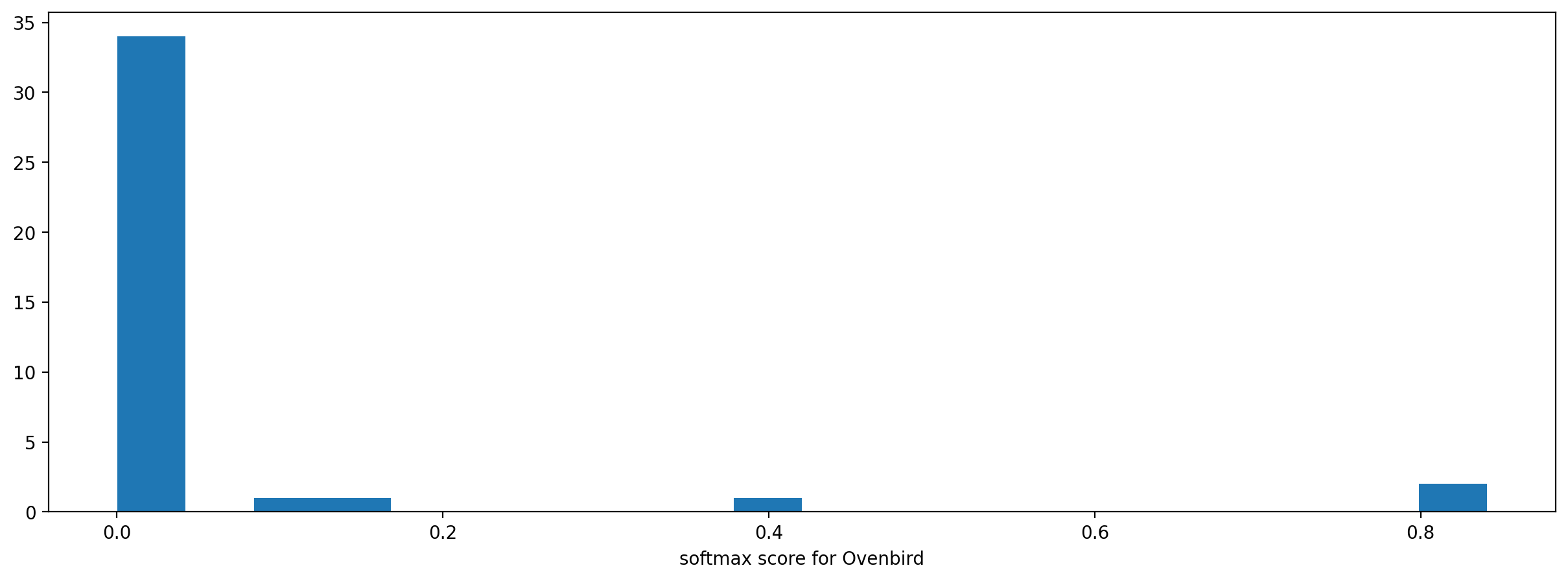
It is sometimes helpful to look at a histogram of the scores, although we only have a handful of clips here so the histogram is sparse.
[26]:
_ = plt.hist(scores["Ovenbird"], bins=20)
_ = plt.xlabel("softmax score for Ovenbird")
/Users/SML161/miniconda3/envs/opso_dev/lib/python3.9/site-packages/matplotlib_inline/config.py:68: DeprecationWarning: InlineBackend._figure_format_changed is deprecated in traitlets 4.1: use @observe and @unobserve instead.
def _figure_format_changed(self, name, old, new):
generate embeddings with the model
Embeddings are typically the outputs of the penultimate layer of the machine learning model. The embeddings can be useful for extracting a “feature vector” for each audio sample, with various downstream applications such as recognition of new classes or clustering based on acoustic qualities. OpenSoundscape and Biaocoustic Model Zoo classification models have a .embed() method with similar inputs and outputs to the .predict() method. Each row in the output is the embedding vector for one audio clip.
[27]:
embeddings = hawkears.embed(audio_files)
embeddings.head()
[27]:
| 0 | 1 | 2 | 3 | 4 | 5 | 6 | 7 | 8 | 9 | ... | 2038 | 2039 | 2040 | 2041 | 2042 | 2043 | 2044 | 2045 | 2046 | 2047 | |||
|---|---|---|---|---|---|---|---|---|---|---|---|---|---|---|---|---|---|---|---|---|---|---|---|
| file | start_time | end_time | |||||||||||||||||||||
| ./1min.wav | 0.0 | 3.0 | 0.0 | 0.0 | 0.015307 | 0.0 | 0.012768 | 0.0 | 0.0 | 0.000000 | 0.03281 | 0.0 | ... | 0.054830 | 0.0 | 0.023428 | 0.0 | 0.00000 | 0.0 | 0.0 | 0.000000 | 0.0 | 0.0 |
| 3.0 | 6.0 | 0.0 | 0.0 | 0.050027 | 0.0 | 0.091175 | 0.0 | 0.0 | 0.114596 | 0.00000 | 0.0 | ... | 0.146361 | 0.0 | 0.104257 | 0.0 | 0.00000 | 0.0 | 0.0 | 0.032779 | 0.0 | 0.0 | |
| 6.0 | 9.0 | 0.0 | 0.0 | 0.134351 | 0.0 | 0.000000 | 0.0 | 0.0 | 0.000000 | 0.00000 | 0.0 | ... | 0.104546 | 0.0 | 0.012909 | 0.0 | 0.00000 | 0.0 | 0.0 | 0.036893 | 0.0 | 0.0 | |
| 9.0 | 12.0 | 0.0 | 0.0 | 0.063012 | 0.0 | 0.068982 | 0.0 | 0.0 | 0.017218 | 0.00000 | 0.0 | ... | 0.098295 | 0.0 | 0.020815 | 0.0 | 0.00000 | 0.0 | 0.0 | 0.000000 | 0.0 | 0.0 | |
| 12.0 | 15.0 | 0.0 | 0.0 | 0.055098 | 0.0 | 0.081135 | 0.0 | 0.0 | 0.000000 | 0.00000 | 0.0 | ... | 0.040954 | 0.0 | 0.107143 | 0.0 | 0.11212 | 0.0 | 0.0 | 0.037764 | 0.0 | 0.0 |
5 rows × 2048 columns
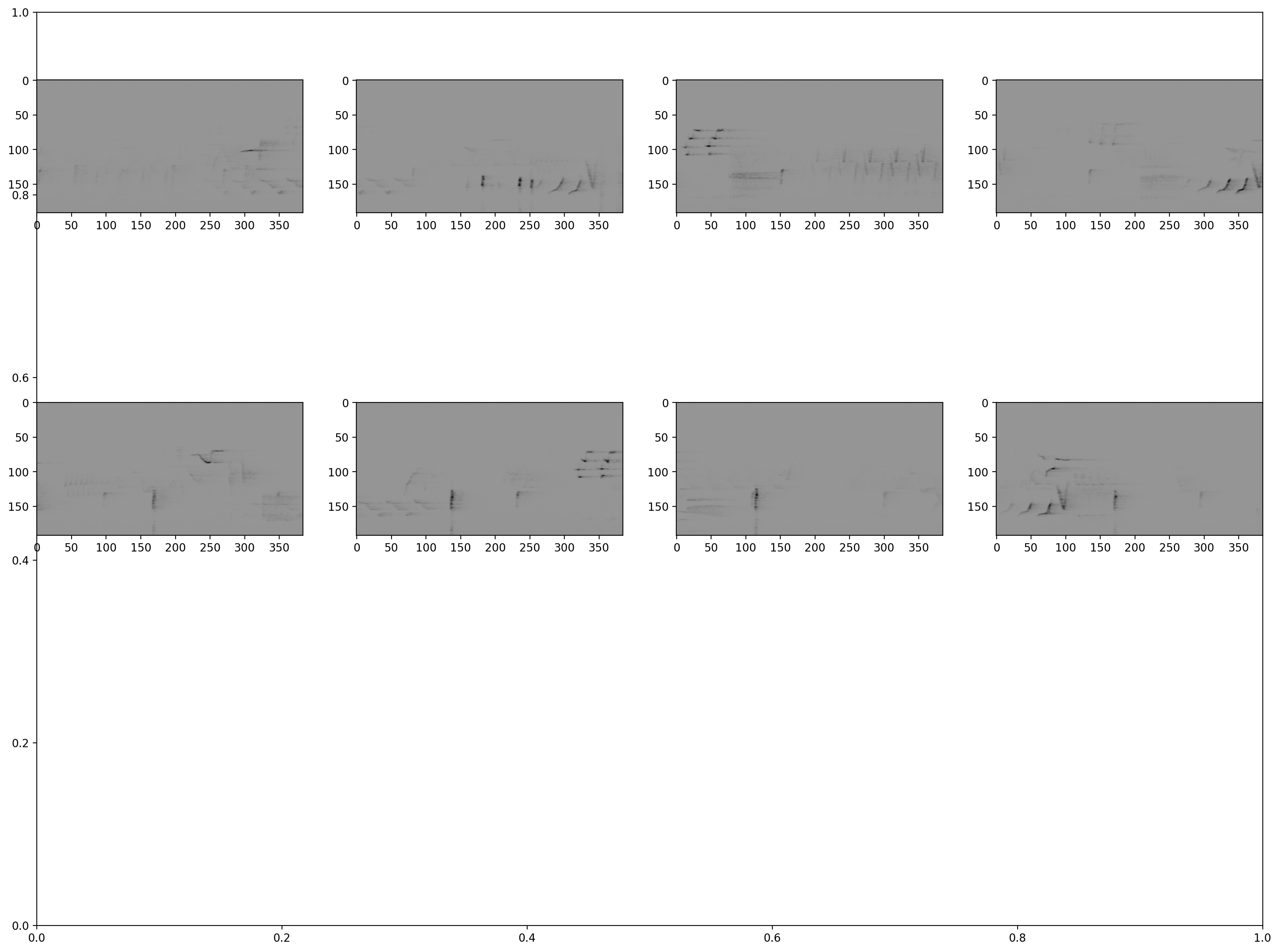
Inspect samples generated during prediction
[28]:
from opensoundscape.preprocess.utils import show_tensor_grid
from opensoundscape.ml.datasets import AudioSplittingDataset
# generate a dataset with the samples we wish to generate and the model's preprocessor
inspection_dataset = AudioSplittingDataset(audio_files, hawkears.preprocessor)
inspection_dataset.bypass_augmentations = True
samples = [sample.data for sample in inspection_dataset.head(8)]
_ = show_tensor_grid(samples, 4)
# here we can see that hawkears produces "upside down" samples where the low frequencies are at the top of the image
Using models trained in older OpenSoundscape versions
Simply load the model with opensoundscape.ml.cnn.load_model(path).
Starting with OpenSoundscape 0.11.0, the default model.save() (for CNN/SpectroramClassifier) is designed to work smoothly across package version updates: the default behavior (pickle=False) saves a state dictionary for the network parameters and a dictionary describing the preprocessing settings, as well as some other information (class list, architecture name, etc) which OpenSoundscape can use to re-create the model from the saved file so long as any custom code used to create the model/preprocessor is still available when loading the model from a file.
In general, if you want to use a model created in an OpenSoundscape <0.11.0 in a newer version, you should:
use or re-create a separate Python environment (eg, conda environment) that has the same version of OpenSoundscape used to create and train the model.
Save the model’s weights like this:
torch.save({'weights':model.network.state_dict()},'my_weights.pt')
You’ll also want to save/take note of the architecture, ordered list of model classes, and sample input shape, and all preprocessing parameters/steps (e.g. sample shape, spectrogram creation parameters, scaling/normalization).
Then, in your new opensoundscape environment, recreate the model with the same architecture, input shape, class list, and preprocessing parameters
Load the saved weights into the model architecture:
weights = torch.load('my_weights.pt')['weights']
my_new_model.network.load_state_dict(weights)
Be aware of changes to default preprocessing settings between OpenSoundscape versions. In particular:
opensoundscape<0.7.0 used the opposite sign convention in preprocessed tensor samples: loud sounds were low values and quiet sounds were high values. Specify
model.preprocessor.pipeline.to_tensor.set(invert=True)to match the default preprocessor behavior of opensoundscape<0.7.0opensoundscape<0.11.0 used skimage interpolation by default in Spectrogram.to_tensor(which is used in the SpectrogramPreprocessor.pipeline.to_tensor action), while newer version use pytorch interpolation by default (much faster). The differences in interpolation methods are subtle but lead to slightly different ML model scores. Specify
model.preprocessor.pipeline.to_tensor.set(use_skimage=True)to match the default preprocessor behavior of opensoundscape<0.11.0.opensoundscape<0.12.0 CNN class’s default Overlay preprocessor had update_labels=False, >=0.12.0 has default update_labels=True
If you need assistance loading a model developed in a different OpenSoundscape version into a more recent version, please contact one of the developers of OpenSoundscape.
Clean up: delete model objects
[29]:
from pathlib import Path
for p in Path(".").glob("*.model"):
p.unlink()
# uncomment to delete the downloaded audio file
# Path('1min.wav').unlink()